Image-to-video: start with a gallery image
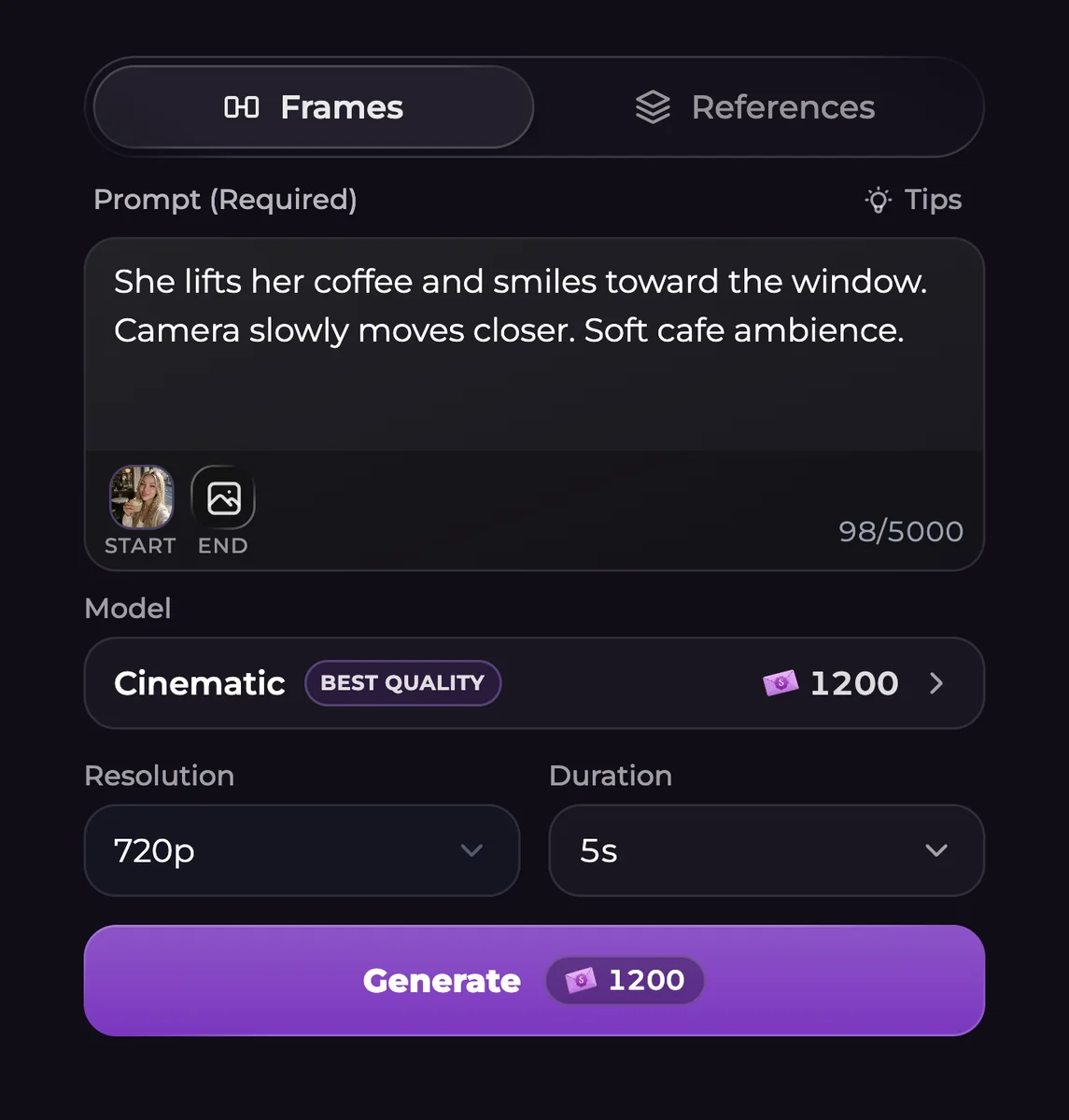
Open Generate, switch to Video, or select Create Video from an image you already made. With Frames selected, the source photo is your starting frame. Describe what moves, how the camera behaves and any sound you want.
For a first attempt, keep the action modest: a character turns toward a window while the camera moves slightly closer. Inspect that result before combining a large pose change, a new location and a complicated camera path in one short clip.
Match the model to the job
The menu includes Intimate with Turbo, Cinematic with Fast, Everyday and Basic. Classic is under More models and uses a simpler source-photo workflow. Model choices have different resolution, duration and reference controls; Intimate supports clips up to 30 seconds, while Cinematic Fast offers resolutions up to 720p.
There is no extra hidden video switch to unlock the current model menu. Pick the available model, then recheck resolution, duration and audio because unsupported settings can adjust when you switch.
| Model | Resolution choices | Clip length | Sound |
|---|---|---|---|
| Cinematic | 480p, 720p, 1080p or 4K | 4-15 seconds | Included |
| Cinematic Fast | 480p or 720p | 4-15 seconds | Included |
| Everyday | 480p or 720p | 4-15 seconds | Included |
| Intimate / Turbo | 480p, 720p, 1080p or 4K | 4-30 seconds | Included |
| Basic | 480p or 720p | 4-15 seconds | Included |
| Classic | 480p, 720p or 1080p | 4-12 seconds | Optional |
Read the total after changing settings
Video generation requires Premium or Ultimate and uses Moments. A five-second example price is not the cost of every duration or resolution. Read the final total on Generate after making your choices.
Open the completed result in the gallery to inspect motion, sound and the last frame. Download it if you want a local copy. A model can misread a movement or distort a detail, so plan to review rather than assume the first version will match every instruction.
Questions
Can Secrets AI animate an image I made earlier?
Yes. Open a supported gallery image and choose Create Video to bring it into the video form as the source.
Can I control the ending frame?
Supported models offer end-frame and reference controls. Classic does not offer the same Frames and References options. Check the selected model's controls before preparing an end image.
Does the generator add sound?
Several current models include audio. Classic has an audio choice, and disabling its audio lowers its price. Review the actual model and settings rather than assuming every clip uses the same behavior.
Is video generation free?
It requires a paid subscription and sufficient Moments. Free chat access and a free Shorts opening episode do not provide unrestricted video generation.